
File Upload Vulnerabilities: The Silent Breach Vector Hiding in Plain Sight
“Security is an illusion — until we test it.”
— Ghost Ops Security
The Problem
Got a file upload feature? You're already a target.
File upload vulnerabilities are one of the most powerful, under-tested backdoors in modern web applications. When mishandled, they allow attackers to gain remote access, execute malicious code, and move laterally through your infrastructure — without detection.
And here’s the kicker: these flaws are shockingly common across sectors.
What Is a File Upload Vulnerability?
These vulnerabilities arise when user-uploaded files are accepted without adequate validation, sanitization, or isolation. Some common weaknesses include:
Accepting files based only on extensions, such as allowing ".exe" files.
MITRE's attack framework reports that 69% of file upload vulnerabilities can be attributed to MIME type spoofing.
Uploading files to web-accessible directories, which can lead to direct exploitation.
Handling executable file types like .php or .jsp improperly.
Insecure file processing within antivirus or document conversion processes.
Once attackers upload malicious files, they can execute harmful code, pivot within the network, or even establish persistent access. This makes file upload vulnerabilities a prime target for both red teams and real-world attackers.
Sectors Most at Risk
Sector | Common Risk Points | What Can Happen |
SaaS Platforms | Profile image uploads, import/export features | RCE, cloud compromise, impersonation |
Legal & Law Firms | Intake portals, e-discovery tools, DMS access | Ransomware, document theft, lateral movement |
Healthcare / MedTech | EMR uploads, lab results, patient forms | PHI exfiltration, EDR bypass, ransomware |
Finance & Fintech | Loan documents, KYC uploads | ATO, fraud, backend system compromise |
Defense & Gov Vendors | Supplier portals, CMMC forms | Nation-state exploitation, backdoors |
E-commerce | Product images, seller dashboards | Website defacement, cart manipulation |
What Attackers Can Do
The ramifications of file upload vulnerabilities can be dire. Here are some of the actions attackers may take:
Remote Code Execution (RCE): Attackers execute their code on the server, potentially resulting in complete system compromise. For instance, a 2019 study showed that RCE vulnerabilities led to over $3.5 billion in damages across various sectors.
Web Shell Deployment with Stealth Access: Malicious files used as web shells can allow attackers to maintain access while flying under the radar of security systems.
Pivot to Internal Hosts: Once inside, attackers can move laterally to other systems, increasing the number of compromised assets.
Privilege Escalation: Attackers can exploit weak configurations to gain higher privileges, worsening the security breach.
Data Exfiltration: Sensitive data theft can lead to significant financial loss and damage to an organization’s reputation. According to IBM’s Cost of a Data Breach report, the average cost of a data breach exceeds $4.35 million.
EDR Evasion & Persistence: Attackers can bypass EDR capabilities, ensuring continued undetected presence within your systems.
At Ghost Ops, we’ve used upload flaws to:
Drop shells into AWS ECS containers
Escalate from client intake forms to entire DMS networks
Bypass AV scanners with disguised payloads
How to Mitigate File Upload Vulnerabilities
To shield your web applications from file upload vulnerabilities, consider implementing the following best practices:
1. Validate File Types
Both client-side and server-side validation of file types is essential. Use a strict whitelist approach, only allowing specific file types necessary for your application. For example, permit only image files like .jpg or .png for profile uploads.
2. Sanitize File Names
Sanitizing file names prevents directory traversal attacks. For example, removing special characters and ensuring the name does not include path information can deter attempts to manipulate file storage.
3. Store Files Outside the Web Root
By storing uploaded files outside of web-accessible directories, you significantly reduce the risk of direct access. This protective measure ensures that uploaded files cannot be executed simply by visiting a URL.
4. Use Content Disposition Headers
Implementing content disposition headers controls how files are handled by the browser, which can prevent their automatic execution upon upload.
5. Implement Antivirus Scanning
Integrating antivirus scanning into your file upload process helps detect and block harmful files before they reach your application. A study from the Cybersecurity & Infrastructure Security Agency (CISA) showed that organizations employing such measures saw a 30% reduction in successful attack attempts.
6. Monitor and Log Uploads
Regular monitoring and logging of file uploads can help spot suspicious activity. Setting up alerts for unusual patterns or unexpected file types can provide an early warning system.
7. Conduct Regular Security Testing
Frequent penetration testing and vulnerability assessments are vital to uncovering and fixing file upload vulnerabilities before attackers exploit them.
🔍 Awareness Is Key
File upload vulnerabilities present significant threats that can lead to severe security breaches. By understanding the risks and adopting robust security measures, organizations can decrease their exposure to these vulnerabilities significantly.
In a rapidly evolving digital landscape, staying alert and proactive in securing file upload features is crucial. Security is not just an illusion; it requires consistent testing and improvement.
By prioritizing security in your applications, you can safeguard your organization from the silent breach vectors that often remain unnoticed.
👻 Meet file_uploader.py: Ghost Ops' Upload Exploitation Tool
file_uploader.py is our in-house weaponized fuzzing tool designed to automate the exploitation of insecure upload endpoints.
What It Targets
Extension filter bypasses (.php, .jpg.php, .php;.jpg)
Web shell uploads and execution
Post-upload RCE detection
Content-Type spoofing for MIME filtering evasion
What It Does
Obfuscates file extensions
Fuzzes Content-Type headers
Uploads test web shells
Detects working shells via ?cmd=id
Drops into an interactive terminal shell
Returns detailed, color-coded results with:
Filename variant used
Shell URL
Execution output
Content-Type spoofed
Real-World Usage
Target: http://victim/upload.php
# Run fuzzing attack
python3 file_uploader.py --upload-url http://address:port/uploadEndpoint.php --base-url http://address:port --fuzz-content-type --magic-bytes
If successful: ghostshell.jpg.php you will see a table with the file upload command that is vulnerable.
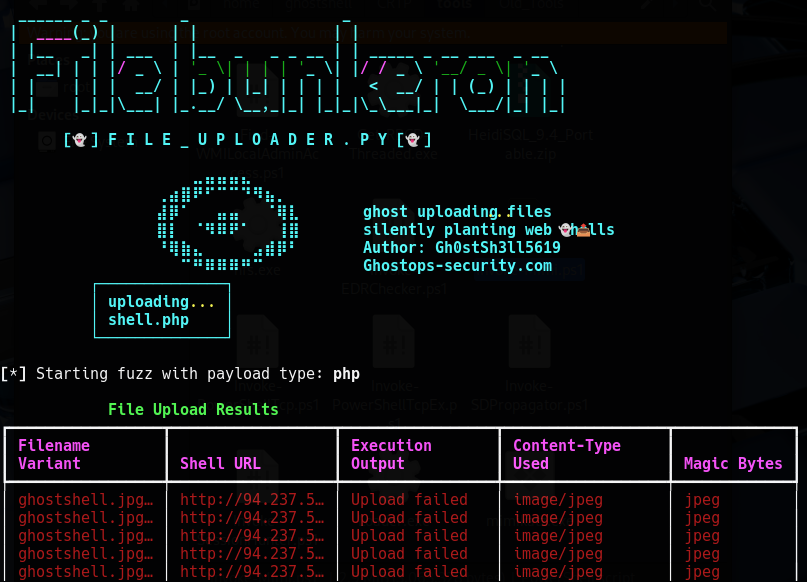

Then, when successful, we choose which file we want to use to interact with the web shell.

Then you’re dropped into:
shell> whoami
www-data

Use Cases for file_uploader.py
SaaS pentests with dynamic upload vectors
Legal firm security reviews before ransomware finds them
Bug bounty triage at scale
WAF & input validation testing
CI/CD testing for image parsers and converters
Ghost Ops: We Weaponize Testing So You Don't Get Weaponized
Security is an illusion — until we test it.
That’s why we don’t run generic scans or hand over surface-level findings. We deploy tools like file_uploader.py in real-world scenarios to uncover the true paths to compromise.


